I’ve gotten a few questions about the PIR sensor enclosures I use. My sensor of choice is the SR602 it accepts a supply of 3.3-18 V and outputs HIGH (3.3V) for 2 seconds when movement is sensed. The form factor is the real reason I prefer it, though. The circuit board for the SR602 is circular and fits perfectly inside a 1/2” PVC fitting.
Showing posts with label Prop Controller. Show all posts
Showing posts with label Prop Controller. Show all posts
Wednesday, August 16, 2023

Friday, April 28, 2023
How to Program a Twitch-n-Howl Board
Both Sparkfun and Arduino.cc have great tutorials on this subject (most of these pictures below are taken from these sites). Links are at the bottom.
If you can program an Arduino, you can program a Twitch-n-Howl board. That's because both boards use the same ATmega328 chip to store and execute code. In order to save space, the Twitch-n-Howl board does not have a USB port. In order to upload code, you will need to set up a dedicated Arduino as a "Programmer" and connect that Arduino to the ISP header of the Twitch-n-Howl.
First connect your "Programmer" board to your computer and upload the ArduinoISP.ino file. This is located in the Examples in the File menu. Upload this just like any other sketch.
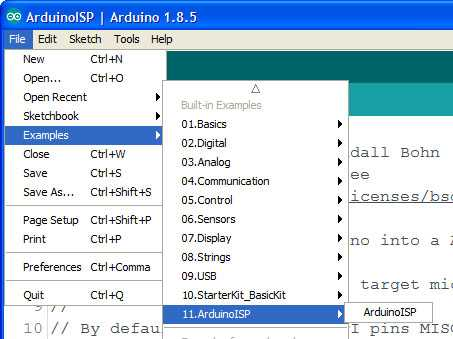
Now you can connect your programmer board (I'm using a Sparkfun Redboard Arduino Uno clone here) to the Twitch-n-Howl. I like using a clip with pogo pins (like this one), but you could also solder a pin header to the board and just use jumpers.


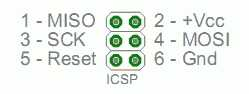
The pins have to be connected in a very specialized pattern
Uno Pin — Name — ISP Pin — Name — Uno Pin
12 MISO O O 5V 5V
13 SCK O O MOSI 11
10 Reset O O GND GND
Here’s what it looks like when connected with jumpers.

Then you simply put the code for the target board in the Arduino IDE (just like coding a board as usual). You will need to select “Arduino as ISP” as the programmer.
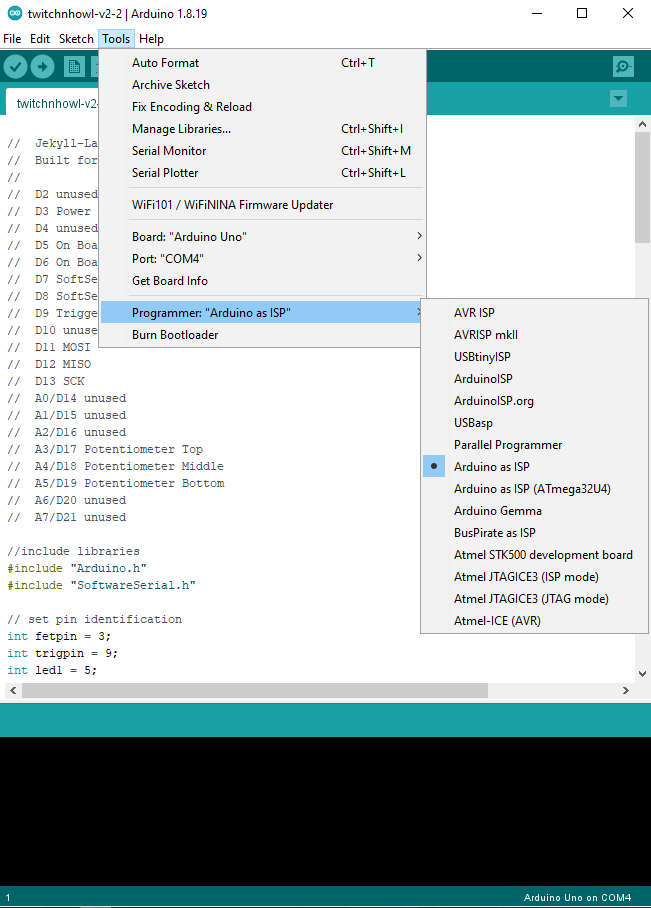
Then you can “Upload Using Programmer”. And, BOOM, your Arduino Uno Programmer board will add the brand new code to your Twitch-n-Howl board.

**On these links you'll see instructions for loading the bootloader onto a new ATmega328 chip. This will be unnecessary for the Twitch-n-Howl board as it has already been done at Jekyll-Labs. **
Sunday, April 23, 2023
Twitchboard v1.7 Code and Schematics
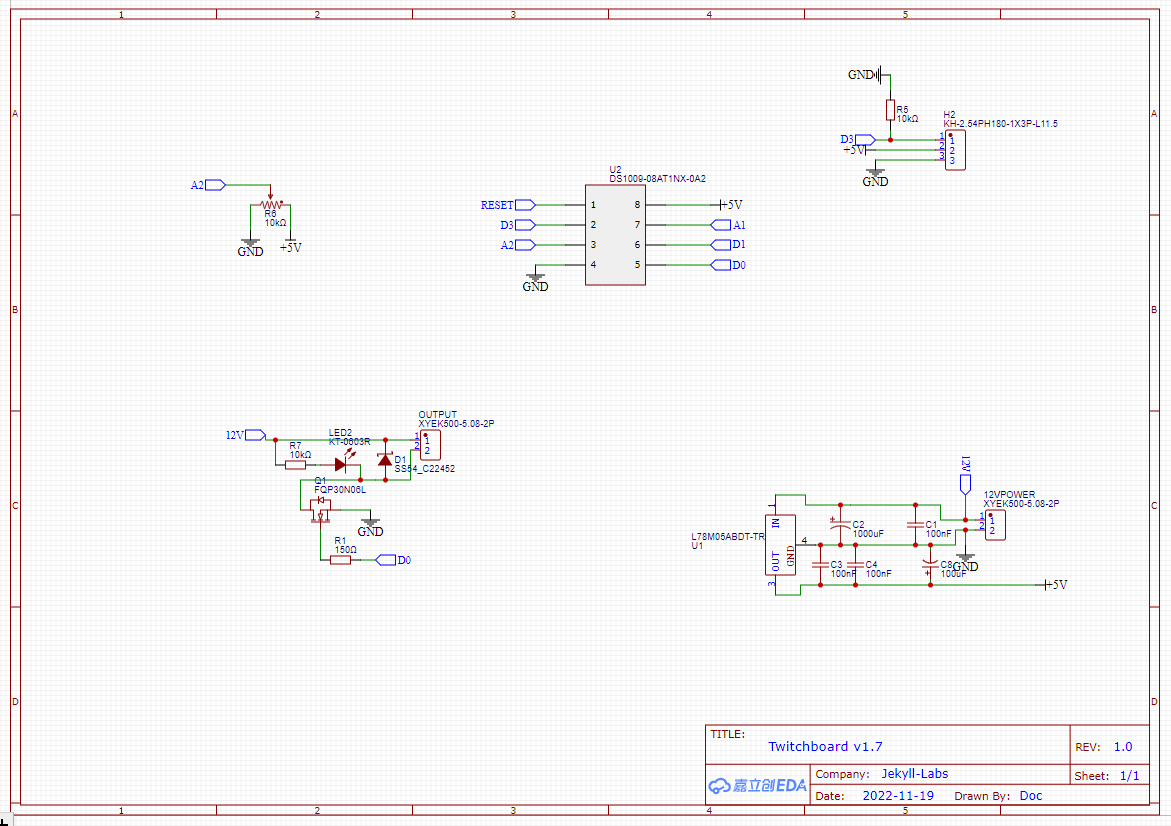
** updated 10-5-23**
Removed (by adding //) the option for continuous on. I've burned out too many (2) door lock actuators by having the interval potentiometer go to zero. Now it will just fire same duration, but more frequently.
//  Jekyll-Labs Twitchy Attiny85
//  Built for Twitchboard v1.7
//

// Pin definitions
int fetpin = 0;
int trigpin = 3;
int potpin = A2;

// global variables
long duration = 200; // duration in miliseconds (200)
long PWM = 255; // Duty cycle 0-255 (255)
long intervallow = 1000; // low end of interval range in sec [2 sec]
long intervalmid = 10000; // middle of interval range in sec [10sec]
long intervalhigh = 90000; // high end of interval range in sec [90sec]
long intervalmax = 36000000; // interval in sec if pot maxed out [10hrs]

// initialize global variables
long timeunit = 0;
unsigned long last = 0;
unsigned long timeinterval = 0;
float exprob=0.50;

void setup() {
  randomSeed(A1);
  pinMode(fetpin, OUTPUT);
  digitalWrite(fetpin, LOW);
  pinMode(trigpin, INPUT);
  pinMode(potpin, INPUT);
}

void loop() {
  // uncomment if pot controls duration
  // duration of signal will last from 0.5 - 10 sec
  //int durationpot = analogRead(potpin);
  //long duration = map(durationpot,100,1023,500,10000);
  //if (duration <500 controls="" duration="150;" fet="" for="" if="" int="" middle="" of="" pot="" pwm="map(PWMpot,0,1000,0,255);" pwmpot="analogRead(potpin);" read="" signal="" uncomment="">255) PWM = 255;

  // uncomment if pot controls frequency
  // mean frequency of random signals is 1 events per time unit
  int freqpot = analogRead(potpin);
  timeunit = map(freqpot,512,1023,intervalmid,intervalhigh); // 2nd half dial range
  if (freqpot>1000) timeunit = intervalmax; // far right dial 1hr
  if (freqpot<512 1st="" adjust="" and="" bottom="" check="" continous="" debounce="" dial="" for="" freqpot="" half="" if="" is="" of="" on="" positive.="" range="" timeunit="" trigger="">0) {
    int trigger = digitalRead(trigpin);
    if (trigger == HIGH) {
      delay(100);
      int trigger = digitalRead(trigpin);
      if (trigger == HIGH) {
        delay (100);
        int trigger = digitalRead(trigpin);
        if (trigger == HIGH) {
          timeunit = (duration * 2);
        }
      }
    }
  }

  // Calcuate time interval between events. timeunit depends on:
  // Potentiometer value if trig = 0
  // Duration multiplier (shorter) if trig = 1
  unsigned long timeinterval = exprob * timeunit;

  // Check if time interval has passed
  if ((millis() - last) > timeinterval) {
    last = millis(); // updates timer to last event
    analogWrite(fetpin,PWM);
    long thisduration = (0.5*duration) +random(duration);
    delay(thisduration);
    digitalWrite(fetpin,LOW);
    // the following equation runs once per event and
    // generates a random float (exprob) that falls in an
    // exponential distribution. It will be used to
    // determine the interval time for the next event.
    // Events that occur at exponentially distributed
    // intervals form poisson processes.
    exprob =  (-2)*(log((100-random(100))/100.00));
  }
  else digitalWrite(fetpin,LOW);

  delay(20);
}
Sunday, April 16, 2023
Twitch-n-howl Code and Schematics v2.2

Code:
//  Jekyll-Labs Twitch and Sound
//  Built for Twitchnhowl v2.2
//
//  D2 unused
//  D3 Power MOSFET (PWM avail)
//  D4 unused
//  D5 On Board LED1
//  D6 On Board LED2
//  D7 SoftSerial Tx
//  D8 SoftSerial Rx
//  D9 Trigger Input
//  D10 unused
//  D11 MOSI
//  D12 MISO
//  D13 SCK
//  A0/D14 unused
//  A1/D15 unused
//  A2/D16 unused
//  A3/D17 Potentiometer Top
//  A4/D18 Potentiometer Middle
//  A5/D19 Potentiometer Bottom
//  A6/D20 unused
//  A7/D21 unused

//include libraries
#include "Arduino.h"
#include "SoftwareSerial.h"

// set pin identification
int fetpin = 3;
int trigpin = 9;
int led1 = 5;
int led2 = 6;
int potMpin = A4;
int potTpin = A3;
int potBpin = A5;

//set SoftSerial for JQ8900 and basic Hex commands
SoftwareSerial mySoftwareSerial(8, 7); // RX, TX
byte playnext[] = {0xAA, 0x06, 0x00, 0xB0 };

// set global constants
unsigned long durationlow = 200; // low end of duration range in msec [0.2sec]
unsigned long durationhigh = 15000; // high end of duration range in msec [15sec]
long intervallow = 2000; // low end of interval range in sec [2 sec]
long intervalmid = 10000; // middle of interval range in sec [10sec]
long intervalhigh = 90000; // high end of interval range in sec [90sec]
long intervalmax = 36000000; // interval in sec if pot maxed out [10hrs]
unsigned long mosfetdelay = 0; // extra delay to turn mosfet on after audio triggered [0]

// initialize global variables
long timeunit = 12; // mean untriggered time interval (sec)
unsigned long last = 0;

unsigned long timeinterval = 0;
float exprob=0.50;

void setup() {
  // setup mosfet pin as output
  pinMode(fetpin, OUTPUT);
  digitalWrite(fetpin, LOW);

  // set up potentiometers and trigger pin
  pinMode(trigpin, INPUT);
  pinMode(potTpin, INPUT);
  pinMode(potMpin, INPUT);
  pinMode(potBpin, INPUT);

  // Set up and turn off LED
  pinMode(led1, OUTPUT);
  digitalWrite(led1, LOW);
  pinMode(led2, OUTPUT);
  digitalWrite(led2, LOW);

  // begin softserial for JQ8900
  mySoftwareSerial.begin(9600);

  last = millis(); // updates timer to start
  randomSeed(A0);

}

void loop() {
  // duration of signal will last from 0.5 - 10 sec
  int durationpot = analogRead(potBpin);
  long duration = map(durationpot,100,1023,durationlow,durationhigh);
  if (duration <500) duration = 150;

  // read middle pot for PWM of fet signal
  int PWMpot = analogRead(potMpin);
  int PWM = map(PWMpot,0,1000,0,255);
  if (PWM>255) PWM = 255;

  // mean frequency of random signals is 1 events per timeunit
  int intervalpot = analogRead(potTpin);
  long timeunit = map(intervalpot,512,1023,intervalmid,intervalhigh); // 2nd half dial range 12-60 sec
  if (intervalpot>1000) timeunit = intervalmax; // far right dial 1hr
  if (intervalpot<512) timeunit = map(intervalpot,75,512,intervallow,intervalmid); // 1st half dial range 0-12 sec
  if (intervalpot<75) timeunit = 0; // bottom of dial continous on

  if (timeunit<=0){ // continuous on if left dial all counter clockwise
    analogWrite(fetpin,PWM);
    digitalWrite(led2,HIGH);
  }

  else {
    // Check for trigger (X3 for debounce) and adjust
    // timeunit if trigger is positive.
    if (timeunit>0) {
      int trigger = digitalRead(trigpin);
      if (trigger == HIGH) {
        delay(100);
        int trigger = digitalRead(trigpin);
        if (trigger == HIGH) {
          delay (100);
          int trigger = digitalRead(trigpin);
          if (trigger == HIGH) {
            timeunit = 2000; // minimum mean interval in sec for triggered events
            digitalWrite(led1,HIGH);
          }
        }
      }
      if (trigger == LOW) digitalWrite(led1,LOW);
    }

    // Calcuate time interval between events. timeunit depends on:
    // Potentiometer value if trig = 0 (not triggered)
    // Duration multiplier (shorter) if trig = 1
    unsigned long timeinterval = exprob * timeunit;

    // Check if time interval has passed and if so trigger event
    if ((millis() - last) > timeinterval) {
      last = millis(); // updates timer to last event
      digitalWrite(led2,HIGH); // indicator LED
      mySoftwareSerial.write(playnext, sizeof(playnext)); // play next MP3
      delay(10);
      if (random(2)<1) mySoftwareSerial.write(playnext, sizeof(playnext)); // 50% of the time skip to next MP3
      delay(100 + mosfetdelay);
      analogWrite(fetpin,PWM);  // turn on mosfet
      delay(duration);
      digitalWrite(fetpin,LOW);
      digitalWrite(led2,LOW);

      // the following equation runs once per event and
      // generates a random float (exprob) that falls in an
      // exponential distribution. It will be used to
      // determine the interval time for the next event.
      // Events that occur at exponentially distributed
      // intervals form poisson processes.
      exprob =  (-2)*(log((100-random(100))/100.00));
    }
    else {
      digitalWrite(fetpin,LOW);
      digitalWrite(led2,LOW);
    }
  }
  delay(20);
}
Saturday, March 11, 2023
Generating a Poisson Process from Uniformly Distributed Pseudo-random Numbers
Most microprocessors generate pseudorandom numbers that follow a uniform distribution. This is great for simulating things like rolling dice where the probability of rolling a 1 is the same as rolling a 4. It turns out, however, that for most natural processes, the time between events is more accurately modeled using an exponential distribution of random numbers. This results in both more clustering of events and larger gaps in between them. These are called poisson processes because the distribution of events-per-time-interval follow a Poisson distribution.
In both of the two samples below, there are twenty events per time interval. In the first sample, events are spaced using a uniform distribution of random numbers. In the second sample, events are spaced using an approximate exponential distribution (thereby generating a Poisson process).

This default code for the Twitch-n-Howl board uses a mathematical transformation to convert the uniformly distributed pseudorandom numbers into exponentially distributed numbers.

This same transformation is depicted graphically below. The blue line shows a uniform distribution of random numbers, while the red line shows an exponential distribution of random numbers. Both distributions have the same mean and area under the curve.

These exponentially distributed random numbers are used to determine spacing between events. One can see that using an exponential distribution of random numbers to determine event spacing would result in some events closer together and some events further apart than would be present using a uniform distribution of random numbers for event spacing. This is one of the properties of a Poisson process and helps explain why natural random events seem so unpredictable.
Friday, December 30, 2022
JQ8900-16p MP3 player
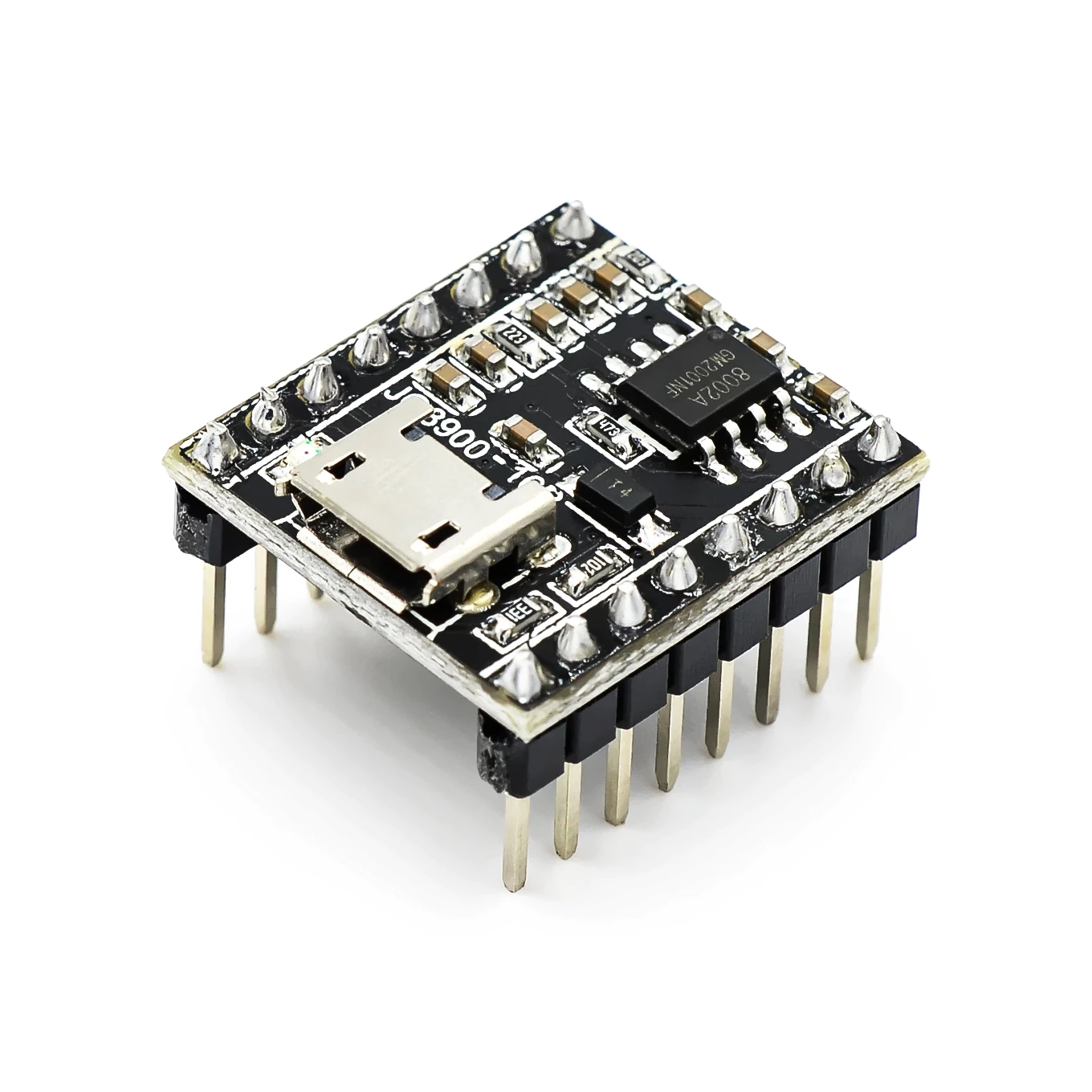
So, I'm really pleased with this new (to me) MP3 player that seems like a nice alternative to the DFPlayer. Its manual is sometimes hard to find so I've hosted a copy of the PFD below. First and foremost, it has onboard storage for audio files. Your computer recognizes it as a USB drive, so it's a simple plug-n-play then drag-n-drop.

(1) There is a two-way serial connection using the Rx and Tx pins. This is the most robust way with many options analogous to the DFPlayer serial connection. Unfortunately, the serial commands are different from the DFPlayer, and I'm not aware of an existing Arduino library. Fortunately, the JQ8900 seems to be based on the JQ8400. The JQ8400 does have an Arduino library, but I have not personally used it. Both the JQ8900 and the JQ8400 have manuals that have been translated into English and have good information.
With the JQ8900, I'm partial to using the serial commands directly. "AA 06 00 B0" will play the next file. I've included below some example code that will every 5 seconds play the next file in sequence.
(2) There is a single wire input mode available using the VPP pin. I haven't personally used this, but there are many examples online (unfortunately for me, mostly in Chinese)
(3) The JQ8900 has 7 trigger pins. These are great. When the IO1 pin is connected to ground the JQ8900 will play the file named 00001.mp3 (and so on). This works well for manual buttons as well as microcontrollers. With this board, I used an ATTINY85 sending a signal to an NPN transistor to connect IO1 to ground.
Audio output is either speaker output (appears to be a 3W amplifier) or line level output via DAC and ground. For both outputs, the JQ8900 collapses the right and left channels into a single mono channel. This is a disadvantage as compared to the DFPlayer, which has mono output for the speaker, but stereo ouput for line level. If you need stereo output, the JQ8900 may not be the board for you.
Links
JQ8900 Manual - English version
JQ8400 Manual - English version
excellent collection of links [Chinese] The JQ8900-16P voice module hardware usage _ Lin Zhong Qiyuan's blog - CSDN blog _jq8900
//include libraries
#include "Arduino.h"
#include "SoftwareSerial.h"

SoftwareSerial mySoftwareSerial(15, 14); // RX, TX

void setup(){
  randomSeed(analogRead(0));
  delay(1000);
  mySoftwareSerial.begin(9600);
  pinMode(4, INPUT);
}

void loop()
{
  byte playnext[] = {0xAA, 0x06, 0x00, 0xB0 };
  int trig = digitalRead(4);
  if (trig == HIGH) {
  mySoftwareSerial.write(playnext, sizeof(playnext));
  delay(5000);
  }
  delay(100);
}
Monday, December 5, 2022
Twitchboard
Previously I worked on a motor controller board that would deliver random pulses to a prop. It worked well, but I was not quite happy with the randomization algorithm, and I wanted more titratable control over the pulses. Additionally I wanted something that could be triggered by either a PIR sensor or a button.
I’ve now produced a beta version of this new controller and I’m looking for feedback. Here’s a demo video—
This is the schematic—

And here is the code—
//  Jekyll-Labs Twitchy Attiny85
//  Built for Twitchboard v1.5
//
int fetpin = 0;
int trigpin = 1;
int potMpin = A1;
int potRpin = A2;
int potLpin = A3;
int lambda = 5; // number of event
int timeunit = 60; // in this time interval (sec)
unsigned long last = 0;
unsigned long timeinterval = 0;
float exprob=0;

void setup() {
  randomSeed(A1);
  pinMode(fetpin, OUTPUT);
  digitalWrite(fetpin, LOW);
  pinMode(trigpin, INPUT);
  pinMode(potLpin, INPUT);
  pinMode(potMpin, INPUT);
  pinMode(potRpin, INPUT);
}

void loop() {
  // duration of signal will last from 0.5 - 10 sec
  int durationpot = analogRead(potRpin);
  long duration = map(durationpot,100,1023,500,10000);
  if (duration <500) duration = 150;

  // read middle pot for PWM of fet signal
  int PWMpot = analogRead(potMpin);
  int PWM = map(PWMpot,0,1000,0,255);
  if (PWM>255) PWM = 255;

  // mean frequency of random signals is 5 events per time unit
  int freqpot = analogRead(potLpin);
  int timeunit = map(freqpot,512,1023,60,300); // 2nd half dial range 1-5 min
  if (freqpot>1000) timeunit = 3600; // far right dial 1hr
  if (freqpot<512) timeunit = map(freqpot,0,512,0,60); // 1st half dial range 10-60 sec
  if (freqpot<100) timeunit = 0; // bottom of dial continous on

  if (timeunit<=0){ // continuous on if left dial all counter clockwise
    analogWrite(fetpin,PWM);
  }

  else {
    // Check for trigger (X3 for debounce) and adjust
    // timeunit if trigger is positive.
    if (timeunit>0) {
      int trigger = digitalRead(trigpin);
      if (trigger == HIGH) {
        delay(100);
        int trigger = digitalRead(trigpin);
        if (trigger == HIGH) {
          delay (100);
          int trigger = digitalRead(trigpin);
          if (trigger == HIGH) {
            timeunit = (duration * 10)/1000;
          }
        }
      }
    }

    // Calcuate time interval between events. timeunit depends on:
    // Potentiometer value if trig = 0
    // Duration multiplier (shorter) if trig = 1
    unsigned long timeinterval = exprob * timeunit * 1000;

    // Check if time interval has passed
    if ((millis() - last) > timeinterval) {
      last = millis(); // updates timer to last event
      analogWrite(fetpin,PWM);
      delay(duration);
      digitalWrite(fetpin,LOW);
      // the following equation runs once per event and
      // generates a random float (exprob) that falls in an
      // exponential distribution. It will be used to
      // determine the interval time for the next event.
      // Events that occur at exponentially distributed
      // intervals form poisson processes.
      exprob =  (-1)*(log((100-random(100))/100.00)/lambda);
    }
    else digitalWrite(fetpin,LOW);
  }
  delay(20);
}
Subscribe to:
Posts (Atom)